

Voice dictation can be substantially faster than typing, and modern AI models have made speech-to-text far more useful for everyday professional writing. Built-in dictation on macOS and Windows has improved too: both platforms support automatic punctuation in at least some configurations, and Windows now offers AI-assisted Fluid Dictation on supported Copilot+ PCs. Dedicated AI dictation apps such as Superwhisper and ParrotKey go further with features such as rewriting, translation, model selection and workflow-specific text transformation. The question is no longer simply whether to dictate, but which dictation workflow fits the way you work.
Superwhisper and ParrotKey both turn speech into polished text anywhere you can type. They approach the job from different angles. Superwhisper is built around configurable modes and model selection, giving power users deep control over which AI model processes each dictation. ParrotKey bundles dictation, two-way translation across 50+ languages, grammar correction and AI text transformation behind a single keystroke, aimed at people who write across language barriers every day.
This comparison uses each product's own public documentation and pricing pages. Where a claim comes from a vendor's own site, it is described as such.
Last fact-checked: August 28, 2026. Features, model availability and pricing can change, so time-sensitive details should always be checked against each vendor's current documentation.
Key takeaways
- Superwhisper is strongest for solo power users who want granular control over AI models, custom modes and prompt configuration, particularly developers dictating into coding assistants.
- ParrotKey is strongest for workflows where bidirectional translation is central: ParrotKey explicitly documents translation to or from 50+ languages. Superwhisper supports 100+ languages, but its current public documentation is inconsistent on translation direction, with its homepage describing translation to English while newer product pages describe translation between languages.
- Superwhisper and ParrotKey both run on macOS and Windows, but their local-processing support is not identical. Superwhisper now explicitly supports on-device transcription on Windows PCs as well as Macs and iPhones. ParrotKey offers local-processing options, but hardware support depends on the model and current app configuration.
- Superwhisper Pro includes access to cloud and local AI models, so bringing your own API keys is optional rather than required for normal Pro use. ParrotKey Pro likewise includes its AI features without requiring a separate model-provider account, while ParrotKey's Own It Forever option also supports local models or your own API key.
- ParrotKey combines dictation, translation, grammar correction and AI rewriting in one app, which can consolidate workflows that would otherwise be spread across separate dictation, translation, grammar and AI writing tools.
- ParrotKey is developed by AppMachine B.V. in the Netherlands, giving European customers an EU-established vendor and controller. ParrotKey states that voice recordings are not retained after processing. Superwhisper's Trust Center lists SOC 2 Type II, HIPAA, GDPR and PIPEDA compliance.
What is Superwhisper?
Superwhisper is an AI voice-to-text app for macOS, Windows and iOS built by Super Ultra Inc. It converts speech into formatted text inside any application, and its central design idea is the "mode": a saved configuration that pairs a voice model with a language model and a set of instructions. You might have one mode for email, another for Slack, another for dictating into a code editor. On its own homepage the company states it is SOC 2 Type II certified and HIPAA compliant, and its Free tier covers voice to text in any app, meeting recording and transcription, 100+ languages and unlimited use of Whisper models.
Superwhisper has become well known in developer circles, largely because it works well as a voice front-end for AI coding assistants. Its site prominently features engineers dictating into tools like Cursor and Claude Code rather than typing prompts by hand.
What is ParrotKey?
ParrotKey is an AI voice assistant for macOS and Windows, built by AppMachine B.V. in Leeuwarden, the Netherlands. ParrotKey combines four core functions behind one key: live voice dictation, AI translation across more than 50+ languages, AI grammar correction, and AI text transformation. It also transcribes uploaded audio and video files, so live dictation and file transcription live in the same app.
The transformation side ships as ready-made prompts rather than something you have to build. You can make text longer or shorter, friendlier or more professional, simplify it, add bullet points, summarise it, or push it to be more impactful, all from a menu. If none of those fit, you can write your own custom prompts and reuse them. The point is that the common jobs are already there on day one, and the custom option is available when you outgrow them.
ParrotKey is designed around a specific frustration: writing professionally when the language you speak is not necessarily the language you need to send. You can speak in one supported language and generate text in another. Bidirectional translation across 50+ supported languages is therefore one of ParrotKey's clearest product differentiators.
Superwhisper vs ParrotKey: side-by-side comparison
| Superwhisper | ParrotKey | |
|---|---|---|
| Desktop platforms | macOS, Windows | macOS, Windows |
| Live dictation in any app | Yes | Yes |
| File transcription | Yes, on the paid tier | Yes, built in |
| Translation direction | Documentation currently varies: homepage says to English; newer pages describe translation between languages | Explicitly to or from 50+ languages |
| Grammar correction | Via AI modes and prompts | Dedicated one-key function |
| Text transformation | Custom modes with your own prompts | Ready-made prompts plus custom prompts |
| Local transcription option | Yes, on-device transcription on Mac, Windows PC and iPhone | Yes, local options available; hardware support varies by model |
| Speech model choice | Broad model selection across providers | Cloud and local models, selectable in settings |
| Own AI API keys | Optional; Pro includes hosted cloud and local models | Not required for Pro; BYOK available with Own It Forever |
| Cost of AI features | Cloud and local models included with Pro; optional BYOK can add provider costs | AI features included with Pro; optional BYOK available separately |
| Tools replaced | Dictation, plus rewriting via custom modes | Dictation, translation, grammar and rewriting |
| Cost to try | Permanent free tier + 3,000-word Pro trial | Permanent free tier + 14-day Pro trial |
| Company location | United States | Netherlands, EU |
| Compliance positioning | SOC 2 Type II, HIPAA, GDPR and PIPEDA per its Trust Center | EU vendor, GDPR compliant; audio not retained after processing |
Which app handles languages better?
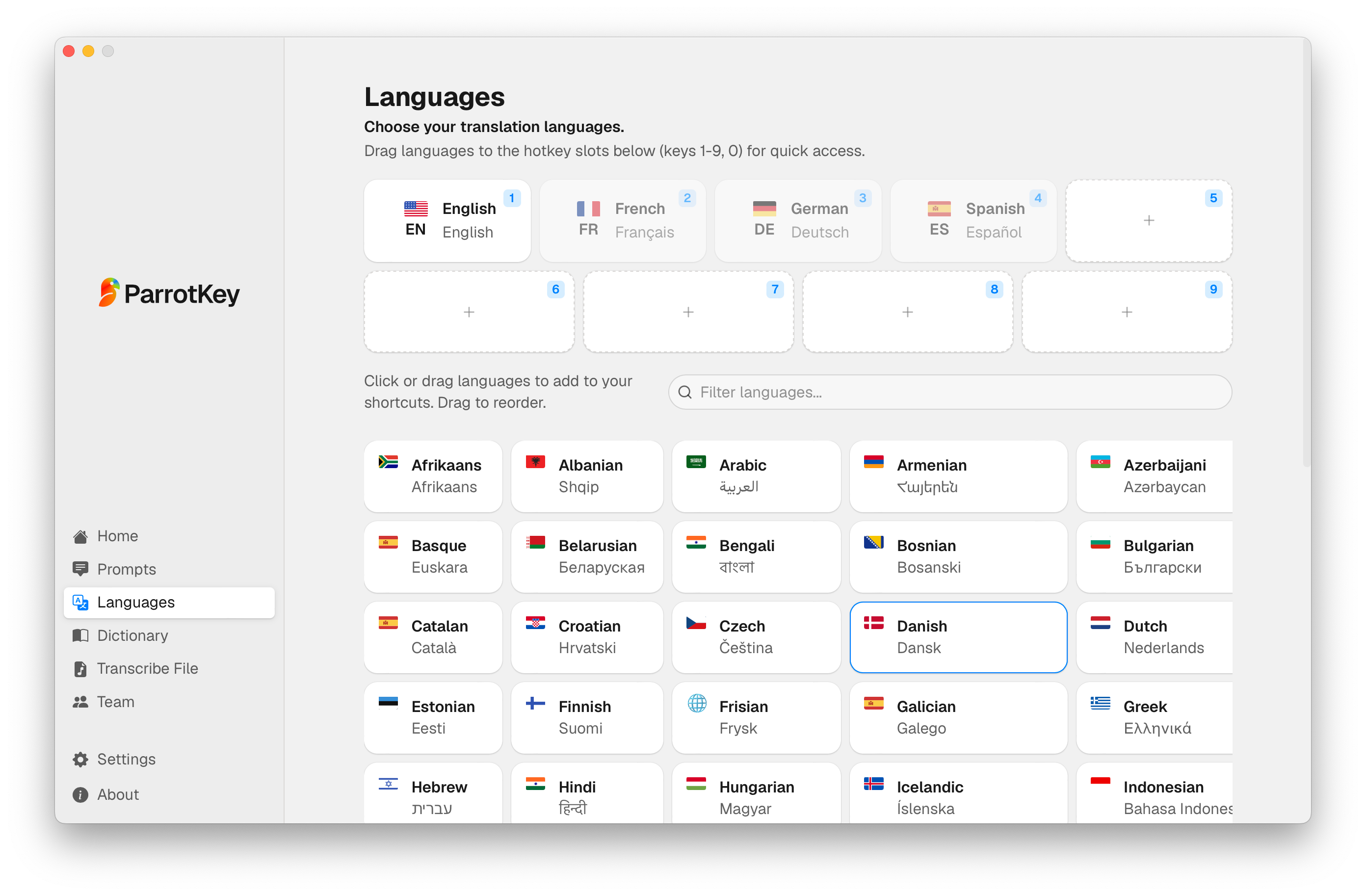
ParrotKey explicitly supports translation to or from 50+ languages, making bidirectional multilingual writing a core part of the product. Superwhisper supports a broader 100+ languages for speech recognition, but its current public documentation is inconsistent about translation direction. The Superwhisper homepage and pricing section describe translating supported languages into English, while newer Windows and speech-to-text pages say users can dictate in one language and have the text translated into another.
That inconsistency means it would be inaccurate to describe Superwhisper as definitively limited to English-only translation. If a specific non-English language pair is essential to your workflow, test that pair before purchasing. ParrotKey's advantage is that bidirectional translation is explicitly documented as a core workflow, while Superwhisper has the advantage in raw transcription language breadth and model configurability. Our multilingual voice-to-text translation buyer's guide explains how to evaluate those differences against your own language pairs.
How do they compare on Windows?
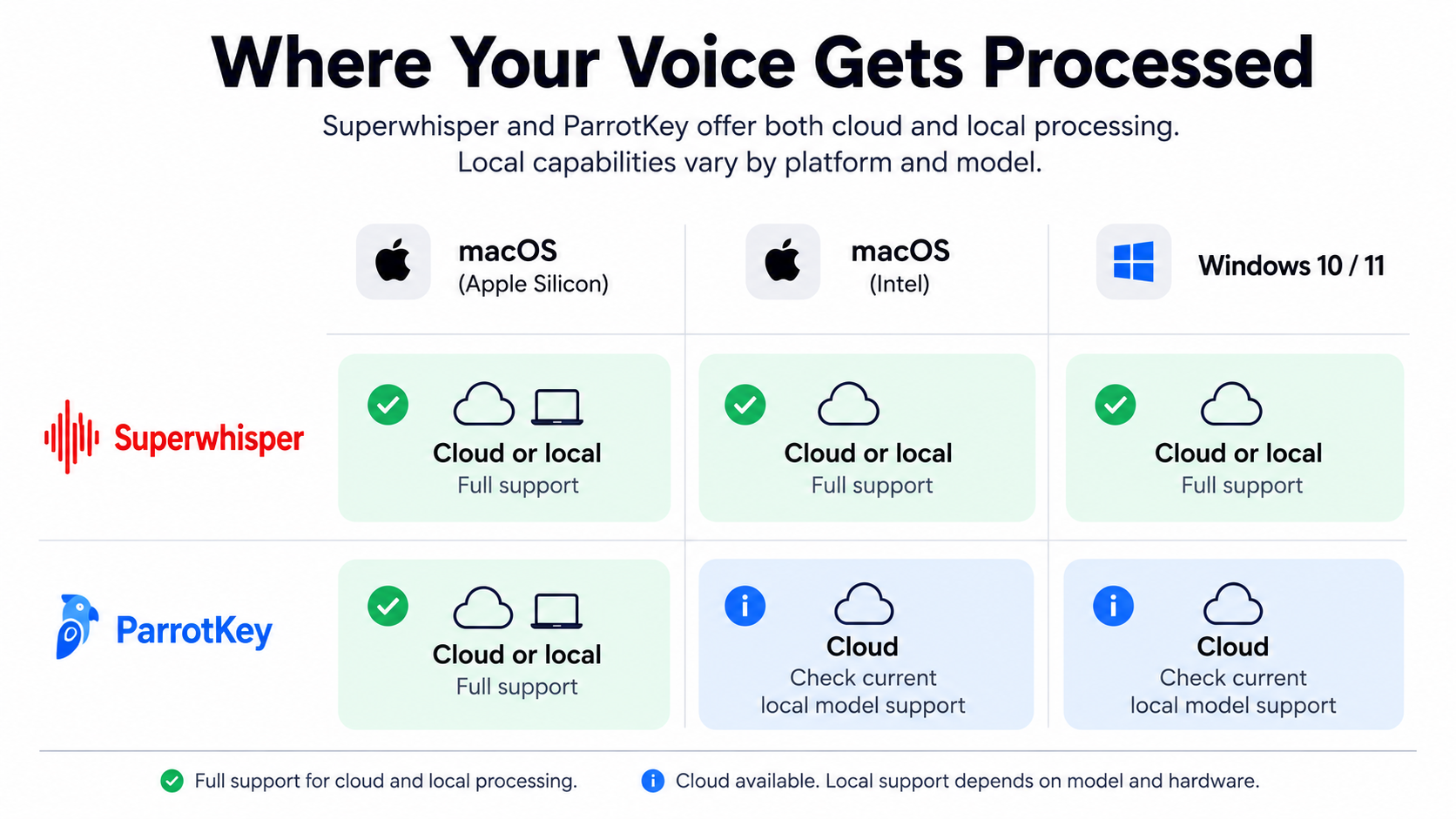
Superwhisper and ParrotKey both offer native Windows desktop apps, but their local-processing support is not identical. Superwhisper now explicitly supports on-device transcription on Windows PCs, with speech models that can run locally without an internet connection. Superwhisper also lists local language models that run on Windows as well as Apple Silicon.
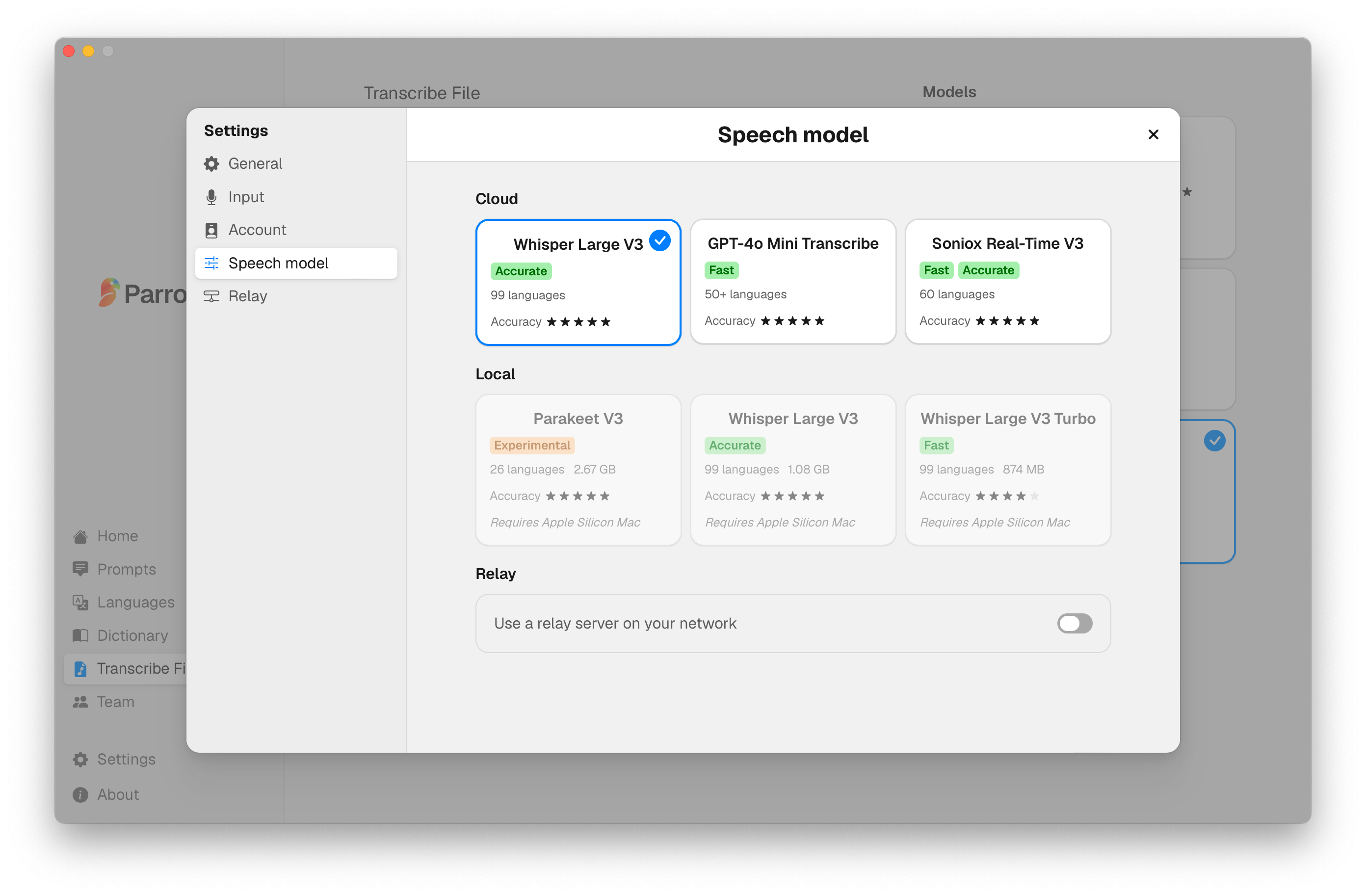
ParrotKey provides its core dictation, translation, grammar and text-transformation workflow on both Windows and macOS. ParrotKey also offers local-processing options, although support depends on the specific model and hardware configuration. The local speech models shown in the ParrotKey settings screenshot used in this article are currently labelled as requiring Apple Silicon.
For mixed Mac and Windows teams, both products therefore provide cross-platform coverage. The more useful distinction is workflow: Superwhisper offers deeper model and mode configuration, while ParrotKey puts translation, grammar correction and ready-made text transforms directly into the writing workflow. If fully offline Windows dictation is a hard requirement, Superwhisper currently documents that capability more explicitly.
How many tools does each one replace?
ParrotKey combines four functions that are often handled by separate tools: dictation, bidirectional translation, grammar correction and AI rewriting. For someone whose current workflow uses a dictation app alongside a translation tool, grammar checker and chatbot for rewriting, that consolidation is the practical argument. Multiple interfaces and copy-paste steps can be replaced by one system-wide workflow. Our breakdown of the hidden cost of translation tools looks more closely at the friction created by switching between separate tools.
Superwhisper can reach similar outcomes through its mode system, since a custom mode with the right prompt can rewrite tone or clean up grammar. The difference is where the work sits. In Superwhisper you build that capability by configuring modes and choosing models; in ParrotKey the transforms and the grammar function ship as dedicated keys. If you enjoy configuring your own workflow, Superwhisper's approach gives you more room. If you want those common writing tasks available as dedicated functions from the start, ParrotKey takes the more preset-driven approach.
Do you need your own AI API keys?
No separate API key is required for normal use of either paid product. Superwhisper Pro includes unlimited access to its supported cloud and local AI models. Superwhisper also allows users to bring their own API keys in supported configurations, but that is an optional capability rather than a requirement for using its cloud models.
ParrotKey Pro similarly includes access to its AI-powered writing features without requiring users to create and fund a separate model-provider account. ParrotKey's Own It Forever option takes a different route: users can run supported models locally or connect their own API key for providers such as Gemini, Claude or ChatGPT.
In other words, a separate model-provider bill is not an unavoidable cost of either standard Pro plan. Provider charges only become relevant when a user deliberately chooses a bring-your-own-key workflow.
Where is your data processed, and who answers for it?
ParrotKey is developed and operated by AppMachine B.V. in Leeuwarden, the Netherlands, so European customers contract with an EU-established company. ParrotKey's privacy policy states that voice recordings are processed immediately and are not stored or retained after processing. Local Whisper and Parakeet models keep audio entirely on the device, while ParrotKey Cloud processes audio on EU servers. Other cloud transcription providers listed by ParrotKey include OpenAI, Groq, Cloudflare and Soniox.
Being an EU-based vendor can simplify contracting and GDPR governance for European organisations, but it does not automatically remove every international-data-transfer question. ParrotKey's own privacy policy says data may be processed in the United States when US-based providers such as OpenAI or Groq are selected, with Standard Contractual Clauses and data-processing agreements used as safeguards.
Superwhisper takes a different compliance approach. Its Trust Center currently lists SOC 2 Type II, HIPAA, GDPR and PIPEDA compliance, and Superwhisper also supports fully local processing for workflows where audio should not leave the device. For procurement teams, the practical question is therefore not simply “EU versus US,” but which processing mode, subprocessors, retention rules and compliance documents match the organisation's requirements.
What does each app actually cost?
As of August 28, 2026, Superwhisper offers a permanent Free tier, Pro at $8.49 per month or $84.99 per year, a $249.99 lifetime option, and custom Enterprise pricing. The Free tier includes voice-to-text in any app, meeting recording and transcription, 100+ language support, Whisper models and custom prompt control. Pro adds the broader set of cloud and local AI models, translation, file transcription and optional bring-your-own-key support. New users currently receive a 3,000-word trial of Pro features, and Superwhisper advertises a 30-day refund period.
ParrotKey also offers a permanent Free plan. The current Free plan includes 2,500 words per week, basic grammar and spell checking, three languages and system-wide use. ParrotKey Pro is currently listed at €12 per month and includes unlimited words, translation across 50+ languages, command mode and additional writing features. New users receive a 14-day Pro trial without a credit card. ParrotKey also lists an Own It Forever option at €99 for local processing or bring-your-own-key workflows.
Neither standard Pro plan requires users to maintain a separate AI-provider subscription. Because software pricing changes frequently, check each vendor's current pricing page before making a purchasing decision.
Setup and daily friction
Both apps work straight after installation. Superwhisper's documented onboarding walks you through permissions, language, model selection with system-optimised suggestions, microphone setup and a guided first dictation, and it ships with built-in modes so you are not writing prompts before you can use it. Superwhisper is therefore usable with its built-in modes before you configure any custom workflows.
The difference is what happens when you want more than the defaults. Superwhisper's depth lives in its mode system: pairing a voice model with a language model, adding your own instructions, and scoping a mode to specific applications. That is real power, and for people who enjoy assembling a toolchain it is the main reason to choose it.
ParrotKey takes a more preset-driven approach. Common jobs such as translating, fixing grammar, shortening text or making it more professional are available as named functions rather than workflows you first need to configure. Custom prompts remain available when the built-in transforms are not enough. Neither approach is objectively better: a developer who wants to tune models and instructions per context may prefer Superwhisper's configurability, while someone who mainly wants to dictate, translate and polish professional communication may prefer ParrotKey's ready-made workflow.
When should you choose Superwhisper?
Superwhisper is the stronger choice for power users who want deep control over speech models, language models, custom modes and prompts, especially developers dictating into AI coding assistants such as Cursor or Claude Code. It is also the stronger option if you want an iOS app alongside macOS and Windows, need explicitly documented offline dictation on Windows, or require Superwhisper's SOC 2 Type II, HIPAA or other compliance documentation. Its permanent Free tier makes it easy to test the core dictation workflow before paying.
When should you choose ParrotKey?
ParrotKey is the stronger choice when multilingual professional communication is the core workflow. Its translation feature explicitly supports moving text to or from 50+ languages, while grammar correction and ready-made text transforms sit alongside dictation in the same app. That makes ParrotKey particularly relevant for multilingual support teams, agencies, consultants and professionals who regularly draft in one language and communicate in another.
ParrotKey also suits teams that prefer predefined writing functions over extensive model configuration, and European organisations that value contracting with an EU-established vendor. For regulated workflows, organisations should still evaluate the selected processing provider and data route rather than assuming that every ParrotKey cloud workflow remains inside the EU.

The cheapest way to decide: try both
Comparison tables can only take you so far, because the thing that decides this is how each app handles your voice, your accent and your actual language pairs. That is testable in an afternoon and costs nothing.
Superwhisper has a permanent Free tier covering core dictation features, with a 3,000-word trial of Pro features. ParrotKey also has a permanent Free plan, currently including 2,500 words per week, three languages and basic grammar correction, plus a 14-day trial of ParrotKey Pro without a credit card. That makes it possible to test both products against your own voice and workflow before choosing.
Run the same three things through both. Dictate a message in your second language and see what lands. Take a rough paragraph and ask each one to make it more professional. Then check whether the output needed editing before you could send it. Whichever app produces text you would actually send is the right answer, regardless of what any comparison article concludes.
The bottom line
Superwhisper and ParrotKey are both capable AI dictation apps, but they optimise for different workflows. Superwhisper stands out for model choice, local processing, configurable modes and developer-focused workflows. ParrotKey stands out for combining dictation with explicitly bidirectional translation, grammar correction and ready-made text transformations for multilingual professional communication.
The best choice therefore depends less on basic speech-to-text accuracy than on what needs to happen after transcription. If you want granular control over models, prompts and local processing, Superwhisper has the deeper configuration layer. If your workflow regularly moves between languages and you want translation and writing assistance available as dedicated functions, ParrotKey is designed around that path.
Both products have free ways to test them. Download ParrotKey's free voice dictation software and compare it with Superwhisper using your actual accent, terminology, language pairs and daily writing tasks.

 Empieza gratis